


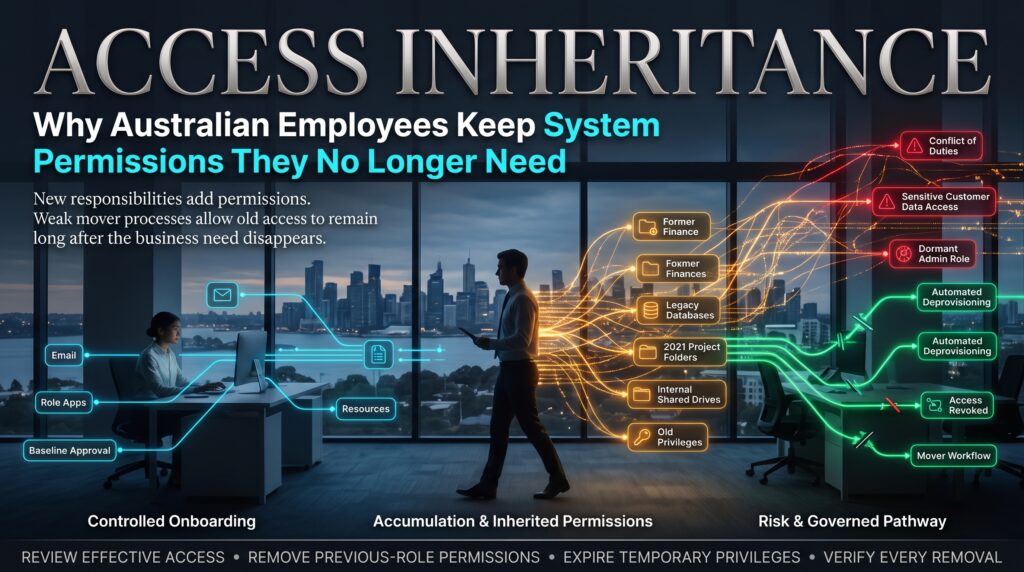

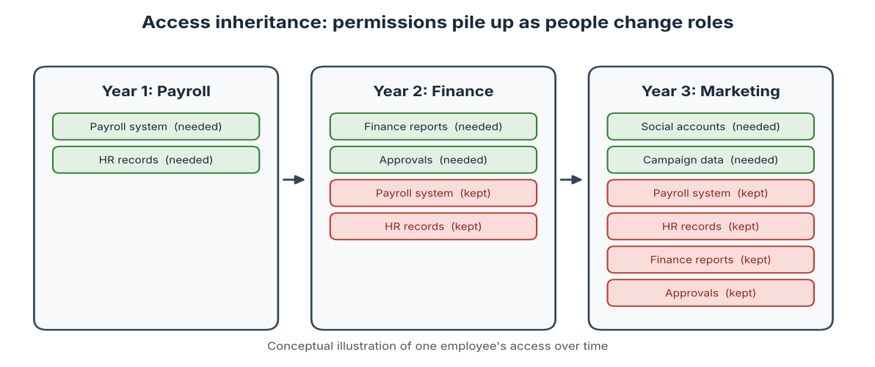
Access inheritance is how a person who moved from payroll to marketing eighteen months ago can still open the payroll system today. Nobody gave her that access on purpose. Nobody took it away either. She simply carried it into her new role, the way you carry a lanyard from one job to the next, and every role since has added another layer.
That is the access inheritance problem. It’s quiet, it’s common and it’s one of the most overlooked weaknesses in Australian workplaces. This guide explains how employees end up with permissions they no longer need, why it matters for security, privacy and cost, and how IT and business teams can fix it without breaking anyone’s day. It’s written for IT staff, managers, auditors and anyone who has ever said, “I’m not sure why I can see that.”
What Is Access Inheritance?
The term is used in two connected ways, and both matter here.
In the technical sense, access inheritance describes how permissions flow downwards. A user is added to a group, and the group has access to a shared folder. A folder passes its settings to everything inside it. A role includes other roles. This is convenient, because it saves administrators from setting every permission by hand, but it also means access can arrive through routes nobody is watching.
In the human sense, access inheritance describes what happens when people change jobs, join projects or cover for colleagues. They collect new access and keep the old. Over time, an employee’s permissions reflect their entire career at the organisation rather than what they need today. Put the two together and you get a system where access builds up faster than anyone can see it.
The practical result is simple: employees end up with system permissions they no longer need. Security specialists often call this permission creep or privilege creep, and it is the problem we’re tackling here.
How Access Inheritance Happens
Nobody sets out to create excessive access. It builds through ordinary, well-meaning habits.
“Give them the same as Sam”
When a new starter joins, the quickest way to set up their access is to copy a colleague’s. But the colleague may have collected years of extra permissions, so the newcomer starts with a bundle that no one has ever reviewed.
Movers keep what they had
When someone changes teams, a new set of permissions is requested for the new role. Rarely does anyone ask for the old ones to be removed. Without a trigger, the old access just stays.
Temporary access becomes permanent
A contractor needs a system for a week. A manager covers for someone on leave. A project needs a one-off data export. The access is granted quickly, because it’s urgent, and nobody sets a reminder to take it away.
Groups and folders pass access along quietly
Nested groups and inherited folder permissions can grant access indirectly. A person might never have been given a permission directly, yet still hold it through a group they joined for another reason. These routes are easy to miss in a standard review.
HR and IT don’t talk to each other
Role changes happen in the HR system. Permissions are managed by IT, and by owners of individual applications. If nobody connects the two, IT only finds out about a change when somebody raises a ticket.
Software-as-a-service sprawl
Departments sign up for their own cloud tools, so permissions are managed in dozens of places rather than one. Each application has its own administrators and its own idea of who should have access.
Restructures and mergers
When teams are reorganised, roles are redefined quickly and access cleanup is left for later. Later rarely arrives.
Why Access Inheritance Is a Real Business Risk
Access inheritance doesn’t feel urgent, because nothing visibly breaks. But it quietly raises risk in several ways:
- Bigger damage from a stolen account. If an attacker steals a password, they inherit everything that account can reach. The more access it holds, the more they can see and take.
- Insider risk. Most staff are trustworthy, but insider threats include honest mistakes as well as deliberate misuse. Fewer permissions mean fewer opportunities for either.
- Privacy and breach exposure. Personal information is only safe when access to it is limited. Broad access makes a breach larger and harder to contain. In Australia, the OAIC oversees the notifiable data breaches scheme, so the consequences of a breach reach well beyond IT.
- Conflicts of duty. Accumulated access can break separation of duties, for example when one person can both create and approve a payment.
- Audit findings. Reviewers regularly flag excessive or outdated access, and it’s tedious to fix under deadline.
- Wasted licence costs. Paid software seats stay assigned to people who no longer use the tool.
In other words, access inheritance is not only a security issue. It affects compliance, finances and trust.
Why Nobody Notices Excess Access
Missing access gets reported quickly, because people can’t do their jobs. Excess access never gets reported, because nobody complains about being able to do more. That asymmetry means access inheritance grows in silence.
There’s also a human reason. Removing access feels risky. If you take something away and a process breaks, you’ll hear about it immediately. If you leave it in place, nothing happens, at least until something does. So the safe-looking choice is to do nothing, and that choice repeats thousands of times across an organisation.
Finally, access reviews often become tick-and-flick exercises. A manager receives a spreadsheet of hundreds of lines, doesn’t recognise the system names and approves everything to get it off their desk. A review that doesn’t give people enough context is a review in name only.
The Principle of Least Privilege and What Australian Organisations Are Expected to Do
The standard answer to access inheritance is the principle of least privilege: people should have only the access they need to do their current job, and no more. It’s a core idea in most security frameworks, including ISO/IEC 27001.
In Australia, the Australian Cyber Security Centre’s Essential Eight includes restricting administrative privileges as one of its mitigation strategies, and you can find more guidance on the cyber.gov.au website. Regulated industries, such as financial services, face further expectations about managing and reviewing access. Check the requirements that apply to your organisation, because the details vary by sector.
Warning Signs You Have an Access Inheritance Problem
- People who changed roles years ago can still access systems from their old teams.
- New starters are set up by copying another person’s account.
- Nobody can easily answer the question, “Who has access to this system, and why?”
- Former contractors or temporary staff still appear in user lists.
- Access reviews are approved in bulk with little discussion.
- Admin rights are held by many people who rarely use them.
- Software licences are assigned to people who never log in.
How to Fix Access Inheritance: A Practical Plan
You can reduce access inheritance without a huge project. Start with the systems that matter most and build from there:
- List your high-risk systems. Begin with finance, payroll, customer data, cloud administration and any system that holds sensitive information. You can’t review everything at once, so prioritise.
- Map who has access to what. Pull a current list of users and permissions, including those inherited through groups. This view alone often surprises people.
- Move toward role-based access. With role-based access control, permissions are attached to defined roles rather than to individuals, so access is easier to understand and to remove.
- Build a joiner, mover and leaver process. Connect HR events to IT actions so that a role change automatically triggers a review of access. Treat a move as a leave plus a join: remove the old access, then grant the new.
- Use time-limited access. For contractors, projects and temporary cover, set an expiry date at the time of granting. Access should end by default unless somebody renews it.
- Run meaningful access reviews. Ask business owners, not just IT, to review who has access. Show names, roles, last-used dates and the reason for each permission, so reviewers can make real decisions.
- Treat privileged accounts separately. Admin access carries the highest risk. Keep it to the smallest group possible, review it more often and consider separate accounts for administrative tasks.
- Automate where it helps. Identity tools, including access review features in platforms such as Microsoft Entra ID, can schedule reviews, send reminders and record decisions, reducing manual effort.
- Remove access safely. Tell owners what’s changing, remove access in stages where the risk is high and keep a clear way to restore it quickly if something breaks.
- Measure and report. Track the number of stale accounts, overdue reviews and removed permissions, and share progress with leaders so the work stays visible.
Joiners, Movers and Leavers: Getting the Process Right
Most access inheritance problems trace back to what happens, or doesn’t happen, when people’s circumstances change. This table shows common mistakes and better habits:
| Event | Common mistake | Better practice |
| Joiner | Copying a colleague’s access, including old permissions. | Start from a standard role template, then add only what’s justified. |
| Mover | Adding new access but never removing the old. | Review and remove old access at the time of the move. |
| Temporary change | Granting access with no end date. | Set an expiry and require renewal. |
| Leaver | Disabling the main account but missing other systems. | Use a checklist covering every system, including cloud tools. |
| Restructure | Redefining roles but leaving permissions untouched. | Schedule an access clean-up as part of the change plan. |
How to Run an Access Review That Reduces Access Inheritance
- Give reviewers plain-English descriptions, not technical codes.
- Show when each permission was last used, so unused access stands out.
- Break large lists into smaller sections so reviewers don’t rush.
- Set a firm deadline and a default action, such as removal, for unanswered items.
- Record decisions and reasons, so you have evidence for audits.
- Follow up on removals and confirm that they happened.
IT Skills That Help You Control Access
Keeping access inheritance under control takes a mix of security knowledge, cloud understanding, networking fundamentals and a grasp of how data is stored and queried. Training helps IT teams build a shared approach to permissions rather than relying on habit. Our courses include:
- Cyber Security Course for the principles behind protecting systems and data.
- AWS Technical Essentials for core AWS services, pricing and security.
- CCNA Certification Training Course for networking fundamentals that underpin secure access.
- SQL Database Training for understanding how data is stored and who can reach it.
- Business Analyst Certification for mapping roles, processes and changes that affect access.
You can compare every option on our IT courses page. If you’re weighing up a certification, our guides can help: read the cyber security certification career guide, find out whether CCNA is worth it in Australia, check SQL training costs in Australia and see whether a Business Analyst certification is worth it.
IT Courses Across Australia: Online and In Person
Access control is a team effort, so it helps when IT, security and business staff learn the same language. Training is available online, live virtual and in person, depending on the city. Find your location below:
- IT courses in Melbourne, with a training location in West Melbourne.
- IT courses in Sydney, with a training location in Surry Hills.
- IT courses in Brisbane, with a training location in Brisbane City.
- IT courses in Perth, available live online or in-house.
- IT courses in Adelaide, available live online or in-house.
- IT courses in Canberra, available live online or in-house.
You can also visit the locations page, learn more about us, read the FAQs, or contact our team on 1300 649 299 to find the right course for you or your team.
Frequently Asked Questions About Access Inheritance
What is access inheritance?
Access inheritance is how permissions pass from groups, folders, roles and previous jobs to a user. Technically, it describes permissions flowing from a parent to its members. In everyday workplaces, it also describes employees keeping old access when they change roles.
What is permission creep?
Permission creep, also called privilege creep, is the gradual build-up of access beyond what a person needs. It usually happens when new access is added over time but old access is never removed.
Why do employees keep old system access?
Because removal needs a trigger and a decision, while granting access happens naturally on request. Without a joiner, mover and leaver process, old permissions stay in place by default.
What is the principle of least privilege?
It means giving people only the access they need to do their current job, and no more. It limits the damage from mistakes, misuse and stolen accounts.
How often should user access be reviewed?
There’s no single schedule. High-risk systems and privileged accounts should be reviewed more often, while lower-risk systems can be reviewed less frequently. Reviews should also be triggered by events such as role changes and restructures.
How can I remove excess access safely?
To reduce access inheritance safely, start with high-risk systems, confirm the need with business owners, remove access in stages where appropriate and keep a quick way to restore it. Communicating clearly beforehand avoids surprises and builds trust in the process.
Final Thoughts on Access Inheritance
Access inheritance rarely makes headlines, because it doesn’t cause problems until it suddenly does. Employees pick up permissions as they move through an organisation, and nobody is responsible for taking them back. The fix isn’t dramatic. It’s a steady habit of linking people changes to access changes, reviewing what matters most and giving everyone the context to make good decisions.
If you’d like to build the skills to manage access with confidence, explore our IT courses in Australia or speak with a course advisor today.