


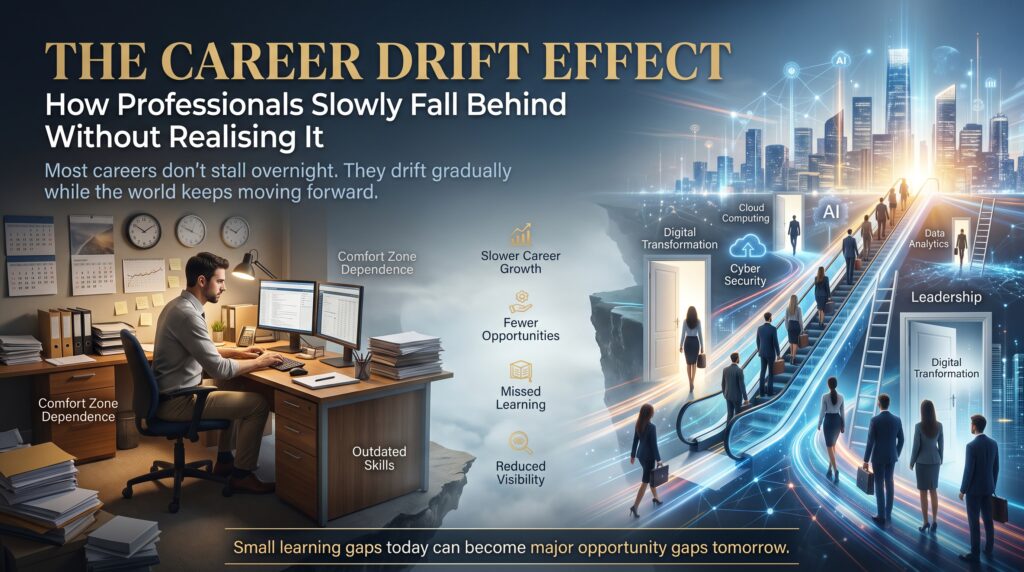

Your IT career expiry date is not printed on your CV, but it exists. Every technology professional has one, and most only discover theirs when a recruiter stops calling, a promotion goes to someone with fewer years of experience, or a job ad lists three tools they have never touched.
The uncomfortable truth is that IT professionals become outdated faster than workers in almost any other field, and the slide is quiet. You still turn up, still fix problems and still get good reviews. Meanwhile the market moves on without you. This guide explains why it happens, how to spot the warning signs, and the practical steps to stay ahead, including course pathways available across Australia.
What Is the IT Career Expiry Date?
The IT career expiry date is the point at which your current skill set stops matching what employers are actually hiring for. It has nothing to do with age and everything to do with relevance. A 25-year-old who learned one framework and stopped can reach it sooner than a 50-year-old who keeps learning every year.
Think of your skills like fresh produce rather than tinned food. Some last longer than others, but none last forever. A skill that got you hired in 2018 may now be a background expectation, or something a cloud service or an AI tool does automatically.
Why IT Professionals Become Outdated Faster Than They Realise

Several forces push in the same direction at once. That is why the drift feels sudden even though it has been building for years.
1. The shelf life of technical skills keeps shrinking
The World Economic Forum’s Future of Jobs Report 2025 found that employers expect 39% of workers’ core skills to change by 2030. That is a global figure across all industries, and technology roles sit near the centre of the change. The same report ranks AI and big data, networks and cybersecurity, and technological literacy as the three fastest-growing skills.
2. Cloud quietly rewrote the job description
A decade ago, a systems administrator looked after physical servers. Today the same role expects cloud services, identity management and cost control. Professionals who stayed on-premises only have watched their IT career expiry date creep closer, because employers now assume familiarity with platforms like AWS and Microsoft Azure. Vendor programs such as AWS Training and Certification show how far the baseline has moved.
3. AI is automating routine work
Generative AI tools now write boilerplate code, draft documentation, triage helpdesk tickets and summarise logs. That does not make IT professionals obsolete. It does mean routine tasks are worth less, and the people who thrive are those who can direct, check and secure AI-assisted work. If your day is mostly repetitive tasks, your IT career expiry date is closer than it feels.
4. Comfort hides the drift
A stable job is the most dangerous place to stop learning. Internal systems often lag the market by years, so you can be senior inside your company and junior in the wider job market at the same time. You only find out when you apply elsewhere, or when the business restructures.
5. Threats and certifications keep moving
Security is the clearest example. Attackers change tactics constantly, and guidance from bodies such as the Australian Cyber Security Centre is updated to match. Vendor certifications also expire or get replaced by newer versions, so a badge from five years ago carries less weight than most people assume.
7 Warning Signs Your IT Career Expiry Date Is Getting Close
- You cannot remember the last new tool, language or certification you learned.
- Job ads for your next step list technologies you have never used.
- You avoid interviews because you suspect the questions have changed.
- Your work is mostly maintenance, and nobody asks you to join new projects.
- Less experienced colleagues are being trusted with cloud, security or AI work.
- Your professional network has gone quiet and recruiters no longer call.
- You describe yourself by the tools you use rather than the problems you solve.
If three or more sound familiar, treat it as a prompt to act rather than a reason to panic. Skills can be rebuilt faster than most people expect.
In-Demand IT Skills That Push Your IT Career Expiry Date Further Away
You do not need to learn everything. Pick the areas where demand is rising and where your existing experience gives you a head start. The Jobs and Skills Australia website is a good place to check occupation trends in the local market. Then match a skill area to a structured course:
- Cyber security: every organisation needs people who understand risk, controls and incident response. See the Cyber Security Course.
- Cloud computing: AWS Technical Essentials covers core AWS services, pricing and security, the knowledge cloud roles now take for granted.
- Artificial intelligence: the Artificial Intelligence (AI) Essentials course introduces essential AI and machine learning concepts, models and ethics.
- Data and databases: SQL Database Training remains one of the most transferable skills in IT.
- Networking: the CCNA Certification Training Course keeps network professionals current with modern infrastructure.
- Web development: the Web Development Course teaches clean code, responsive layouts and deployment.
- Business analysis: the Business Analyst Certification suits IT professionals who want to bridge technology and business.
How to Stay Relevant in IT: A Simple 90-Day Plan
Staying ahead of your IT career expiry date does not require a career break. It requires a small, consistent routine.
| Timeframe | What to do | Result |
| Days 1–30 | Compare your skills with 10 real job ads. Choose one growth area and list the gaps. | A clear skills-gap list |
| Days 31–60 | Enrol in a structured course with hands-on labs. Study a few hours each week. | New practical skills |
| Days 61–90 | Build a small project, update your CV and LinkedIn, and book a certification exam. | Visible proof of skills |
After 90 days, repeat the cycle. The professionals who never reach their IT career expiry date are not geniuses. They simply treat learning as routine maintenance, like patching a server.
Where to Upskill: IT Courses in Melbourne, Sydney, Brisbane, Perth, Adelaide and Canberra
Location no longer limits your options. IT Courses offers weekday, evening and weekend schedules, with classroom training in major cities and live online or in-house delivery for teams and remote learners. Check local details for Melbourne, Sydney, Brisbane, Perth, Adelaide and Canberra. You can also browse all IT courses in Australia, read the course FAQs or contact the team for help choosing a pathway.
IT Career Expiry Date FAQs
Do IT skills really become outdated that fast?
Some do. Programming frameworks, cloud services and security tools change every year or two, while fundamentals such as networking, databases and problem-solving age slowly. The goal is to keep the fundamentals and refresh the tools around them.
Are older IT professionals more at risk?
Age is not the cause; stalled learning is. Experienced professionals bring judgement, communication and systems thinking that juniors and AI tools cannot easily replace, as long as they add current tools on top.
Which IT skills should I learn first?
Start where your experience overlaps with growth. Cyber security, cloud, AI, data and networking are consistently listed among the fastest-growing areas.
How long does it take to upskill?
Most people can build a solid new foundation in a few weeks to a few months of part-time study, then deepen it on the job. Short courses are designed for exactly this.
Is it too late to change direction at 40 or 50?
No. Many learners join short courses as career changers. What matters is a clear plan and a steady study routine.
Final Thoughts: Beat Your IT Career Expiry Date Before It Beats You
Nobody can stop technology changing, but you can decide how you respond. Audit your skills honestly, pick one growth area, and commit to a structured course this quarter. Small, steady effort now is far cheaper than a forced career reset later.
Ready to check where you stand? Explore IT courses in Australia or call 1300 649 299 to talk to the team about the right pathway for your goals.