


An IT portfolio that gets interviews does one thing a resume alone can’t: it proves you can actually do the work. Hiring managers across Australia now routinely ask candidates for a portfolio link before they even schedule a first call, and entry-level applicants without one are increasingly filtered out before a human ever reads their resume.
This guide walks through exactly what belongs in an IT portfolio, breaks down a real project example step by step, and compares the platforms candidates use to host their work so you can put together something that actually earns you an interview.
Why an IT Portfolio Matters More Than Your Resume in 2026
A resume tells an employer what you claim to know. A portfolio shows them. In a job market where certifications and bootcamp graduates are common, a well-documented project is one of the few things that clearly separates candidates who can apply their skills from candidates who have only studied them.
- Recruiters spend an average of a few seconds on a first resume pass a portfolio link gives them a reason to look closer.
- Technical interviewers frequently base their first question on a candidate’s own portfolio project rather than a generic whiteboard problem.
- A portfolio demonstrates communication skills how clearly you can explain a technical decision which resumes rarely capture.
What to Include in an IT Portfolio
A strong IT portfolio doesn’t need to be large it needs to be complete. Each project should include the following components:
| Component | Why It Matters |
| Problem statement | Shows you can identify a real business or technical problem worth solving |
| Approach & tools used | Demonstrates decision-making, not just execution |
| Screenshots or diagrams | Gives reviewers something to look at without cloning your repo |
| Code or configuration | Lets technical interviewers verify the work is genuinely yours |
| Outcome or metric | Turns a project into a result — the detail that stands out in an interview |
Real Project Example: Building a Cloud Monitoring Dashboard
To make this concrete, here’s a real, achievable project example suitable for a candidate targeting a cloud, sysadmin, or junior DevOps role: a cloud resource monitoring dashboard built on a free-tier Azure subscription.
Step 1: Choose a Project That Matches Your Target Role
Rather than a generic to-do list app, pick something aligned to the job you actually want. For a cloud-focused role, that might mean deploying a small set of Azure resources and monitoring them directly relevant to real day-one tasks in that job.
Step 2: Document the Problem and Your Approach
Frame the project as solving a problem: “Small teams often lack visibility into resource costs and uptime across multiple Azure resource groups.” Then explain the approach which Azure services were used, why a particular resource group structure was chosen, and what trade-offs were made.
Step 3: Show the Technical Build
Include the actual configuration: resource group naming conventions, the monitoring service used (such as Azure Monitor), and any automation scripts. A short architecture diagram showing how the pieces connect is often more persuasive to a reviewer than pages of code.
Step 4: Add Metrics and Outcomes
Even a personal project can report a result: “Reduced manual resource checks from a weekly task to an automated daily alert” reads far better than “built a dashboard.” Quantify wherever genuinely possible.
Step 5: Publish and Link It Properly
Host the project somewhere reviewable a public GitHub repository with a clear README is the industry standard and link it prominently from your resume, LinkedIn, and any job application, not buried on a personal site’s third page.
Portfolio Platforms: GitHub vs Personal Website vs LinkedIn Featured
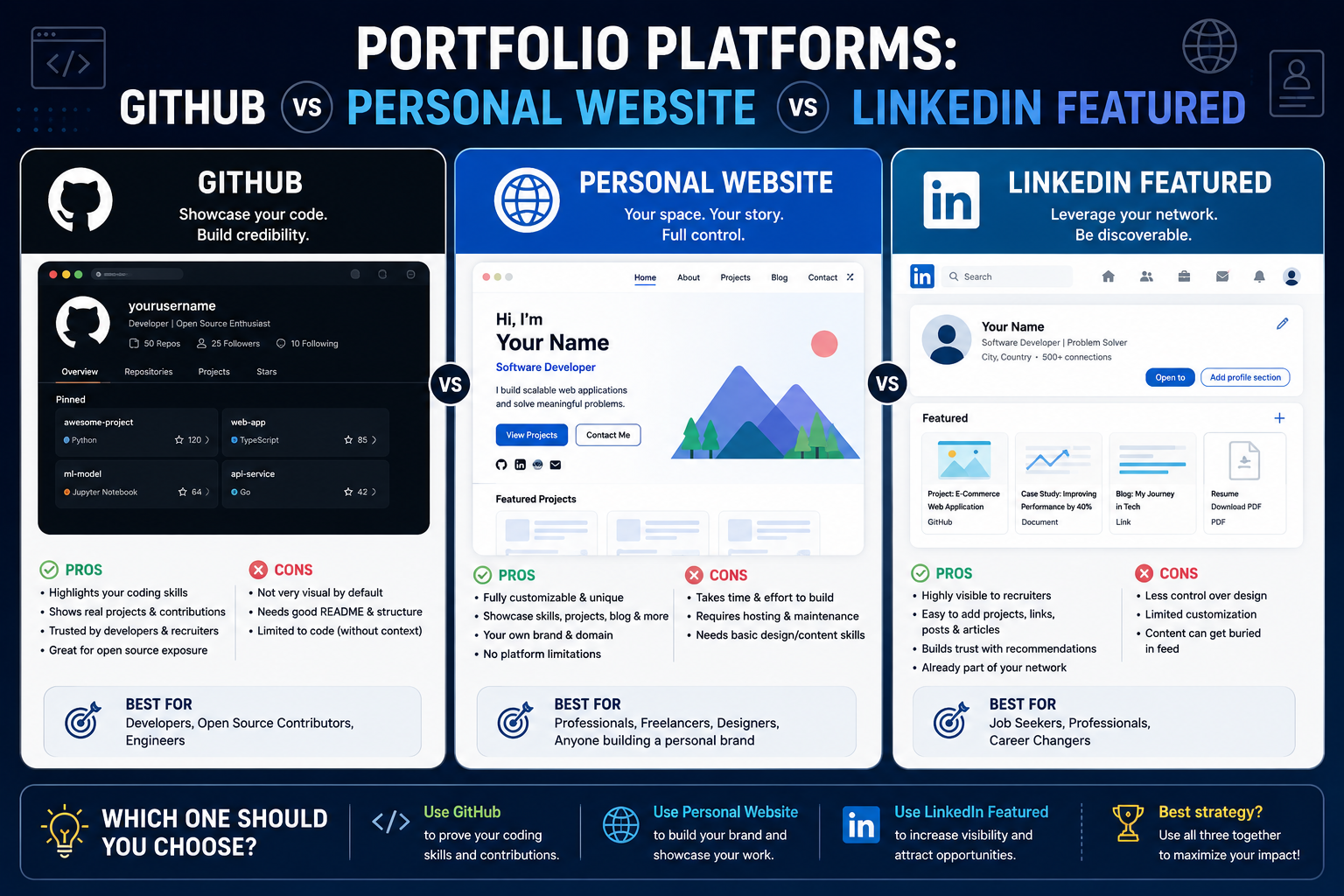
| Platform | Best For | Limitation |
| GitHub | Showing actual code, commit history, and technical depth | Less visual needs a strong README to explain context |
| Personal website | Presenting multiple projects with narrative and design | Takes more time to build and maintain |
| LinkedIn Featured | Getting projects seen by recruiters already viewing your profile | Limited space for technical detail |
Common Portfolio Mistakes That Cost IT Candidates Interviews
- Uploading a project with no README or explanation of what it does and why.
- Copying a tutorial project without any personal modification or added complexity.
- Listing a portfolio link on a resume that leads to an empty or half-finished GitHub profile.
- Focusing only on code with no mention of the problem it solves or the outcome achieved.
- Never updating the portfolio after landing the first certification it should grow alongside your skills.
IT Portfolio Examples by Career Path
| Career Path | Strong Portfolio Project Idea |
| Cloud / Azure | Deploy and document a multi-resource-group Azure environment with monitoring |
| Cybersecurity | Set up a home lab demonstrating a firewall configuration and incident response walkthrough |
| Data Analytics | Publish a Power BI dashboard analysing a public Australian dataset |
| Business Analyst | Document a full requirements-gathering case study with process diagrams |
| Project Management | Publish a project charter, risk register, and retrospective from a real or simulated project |
| Software Testing | Build a test plan and automated test suite for an open-source application |
Where to Build the Skills Behind Your Portfolio: IT Training Across Australia
A strong portfolio starts with a solid skills foundation. Logitrain delivers instructor-led IT training across the following Australian cities:
| City | IT Training Availability |
| Sydney | Classroom and live online IT certification courses |
| Melbourne | Regular intakes across cloud, data, and security tracks |
| Brisbane | Live online and in-person training options |
| Perth | Flexible scheduling for WA-based professionals |
| Adelaide | Fundamentals through to advanced certification pathways |
| Canberra | Popular with government and public-sector IT teams |
How Logitrain Training Helps You Build a Portfolio-Ready Skill Set
The projects that impress interviewers are built on real, structured skills not guesswork. Our Azure certification courses and AZ-900 fundamentals course give cloud-track candidates the exact foundation used in the project example above. For other paths, our cybersecurity certification courses, data analytics courses, business analyst course, and project management certifications each map directly to a portfolio project idea in the table above.
For the full catalogue of instructor-led IT courses across Australia, visit Logitrain.
Frequently Asked Questions
How many projects should an IT portfolio have?
Two to four well-documented projects are generally more effective than ten unfinished ones. Depth and clarity matter far more than volume.
Do I need to know how to code to build an IT portfolio?
No. Portfolio projects exist across every IT career path cybersecurity labs, data dashboards, business analysis case studies, and project management artefacts are all valid, code-free portfolio pieces.
Should I include unfinished projects in my portfolio?
Only if clearly labelled as in-progress with a note on what’s left to do. An unfinished project without context can read as abandoned work rather than a work in progress.
Ready to build the skills behind your next portfolio project? Explore our IT courses today.